
Electrical enclosure demo


Demo insights
Learn more about how this demo was set up and the DriveWorks technology it uses.
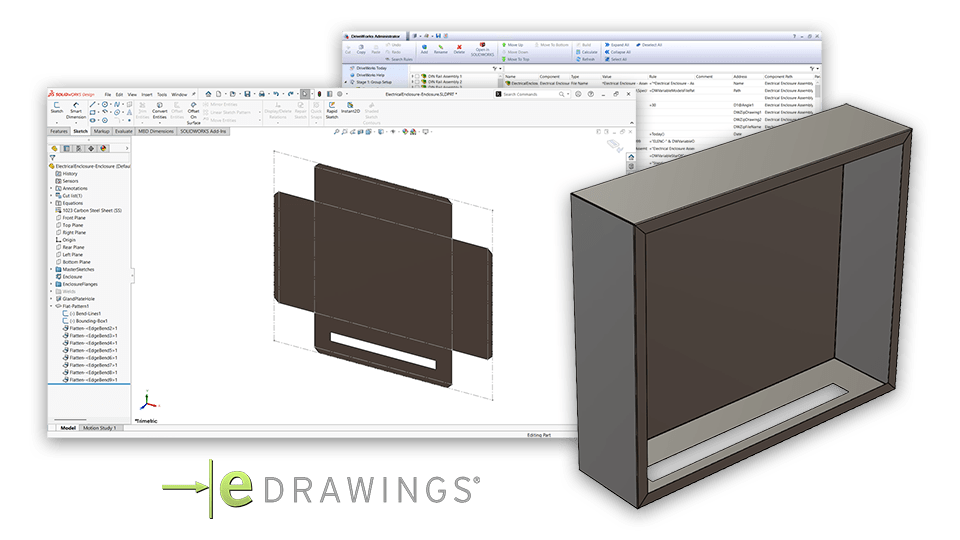
SOLIDWORKS® sheet metal automation
The electrical enclosure demo shows how DriveWorks can be used to automate SOLIDWORKS sheet metal features, insert parts, and output drawings.
- Rules capture engineering knowledge and decision-making to accurately calculate how sheet metal features, dimensions, and advanced feature parameters should be automatically updated based on form inputs.
- New order-specific drawings for flat pattern parts are created and exported as DXFs.
- Insert components, create coincident mate and distance mate generation tasks are used to insert electrical components on DIN rails in the electrical enclosure.
- Components inserted into the assembly are added to the SOLIDWORKS BOM automatically.
Interactive configuration
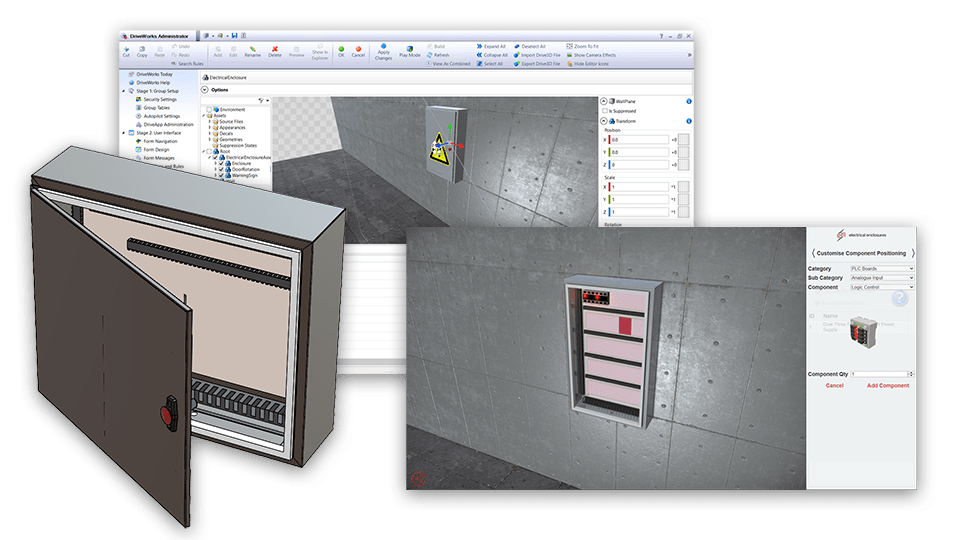
DriveWorks 3D preview lets users configure the electrical components inside their configured enclosure using pick and place accuracy.
- The combination of 3D visualizations and images on forms make accurately configuring an enclosure simple.
- Environment geometry places the configured enclosure in an industrial setting, helping users visualize the product.
- Textures, appearances, lighting, effects, and animations add realism and aid user understanding.
- The 3D replace component entity and 3D click macro entity work together to give users the ability to add components to the DIN rails at valid locations.
Next steps
Learn how DriveWorks can help you achieve your goals.
Industry spotlight
Machinery
Learn how DriveWorks technology enables machinery manufacturers to automate complex engineering design tasks, maintain quality standards, and deliver customized products quickly.
Customer story
ROSE Systemtechnik
ROSE Systemtechnik GmbH save time and engineering resources by automating SOLIDWORKS with DriveWorks design automation and product configurator software.
Article
What is Engineer to Order (ETO) manufacturing
Engineer to Order (ETO) is a manufacturing process where products are designed, engineered, and produced specifically to meet the unique requirements of individual customers.
Request a demo with a technical specialist
Request a demo and a member of the DriveWorks team will be in touch.